


Description
4K Ultra HD Support
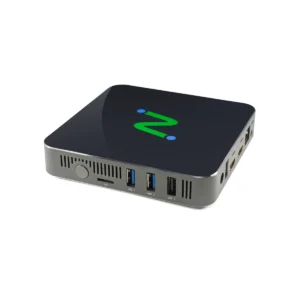
Powered by Intel x86-64 CPU architecture (Intel Quad-Core N5095 2.0Ghz with burst frequency up to 2.9Ghz) and LEAF OS, EX500W provides exceptional multimedia capabilities demanded by knowledge workers delivering resolutions up to 4K Ultra HD (4096 x 2160) in native dual display. EX500W features dual display capabilities via two HDMI ports
Next-Level Endpoint Security
By implementing NComputing’s solutions, organizations can enhance endpoint security, safeguard sensitive data, reduce costs, and streamline management. These measures cover the entire endpoint security spectrum, from device boot to locked-down operating systems, secure communications, data leakage prevention, and centralized management. Furthermore, NComputing enables organizations to embrace BYOD initiatives while maintaining a secure computing environment.
Broad USB Peripheral Support
EX500W allows transparent redirection of USB peripheral devices (and supports x86 drivers) for mass storage, printers, scanners, smart card readers, headsets or speakers, webcams, COM ports, and 3D mice in addition to the standard keyboards and mice. Network-connected printers can also be redirected to desktop virtualization sessions.
Microsoft Teams Optimization
Available on EX500W thin client and LEAF OS devices, audio and video streams in Microsoft Teams are offloaded from the Microsoft AVD, Windows 365, RDS, Citrix, Omnissa Horizon, and UDS Enterprise sessions, enabling them to be processed locally on the client device. Deliver clear, crisp high-definition audio-video conferencing with integrated Microsoft Teams Optimization. Users can seamlessly participate in audio-video or audio-only calls to and from other users and other standards-based desktop video and conference room systems.
Local Application Support
LEAF OS includes select local applications that run on the device, not through a virtualization platform. Direct access to the web via Chromium Browser eliminates virtualization lag. Microsoft Teams PWA and Zoom both benefit from direct audio/video relay eliminating common concerns of web conferencing through virtual platforms. Additional 3rd party Linux applications can be installed in LEAF OS via the custom module support to further extend its functionality. LEAF OS controls the availability of these apps and their deployment method, with a Guest Mode option for Kiosk-like use.
Connections
- Power button
- USB 3.0 port
- USB 2.0 port
- DC Power
- HDMI port
- RJ45 Ethernet
- Aux/Mic 3.5mm audio
- Indicator light (behind)



Reviews
There are no reviews yet.